









Master account
One login covers every team account, all 2FA enforced.
 See how it works

Affiliate operations involve a lot of small clicks. Onboarding a new partner. Updating a reward plan after a negotiation closes. Pulling yesterday’s FTDs for a single row. Wiring a postback for a new brand. ReferOn trims friction from every single action, making a roster of 200 partners feel like managing 20.
The unit of work
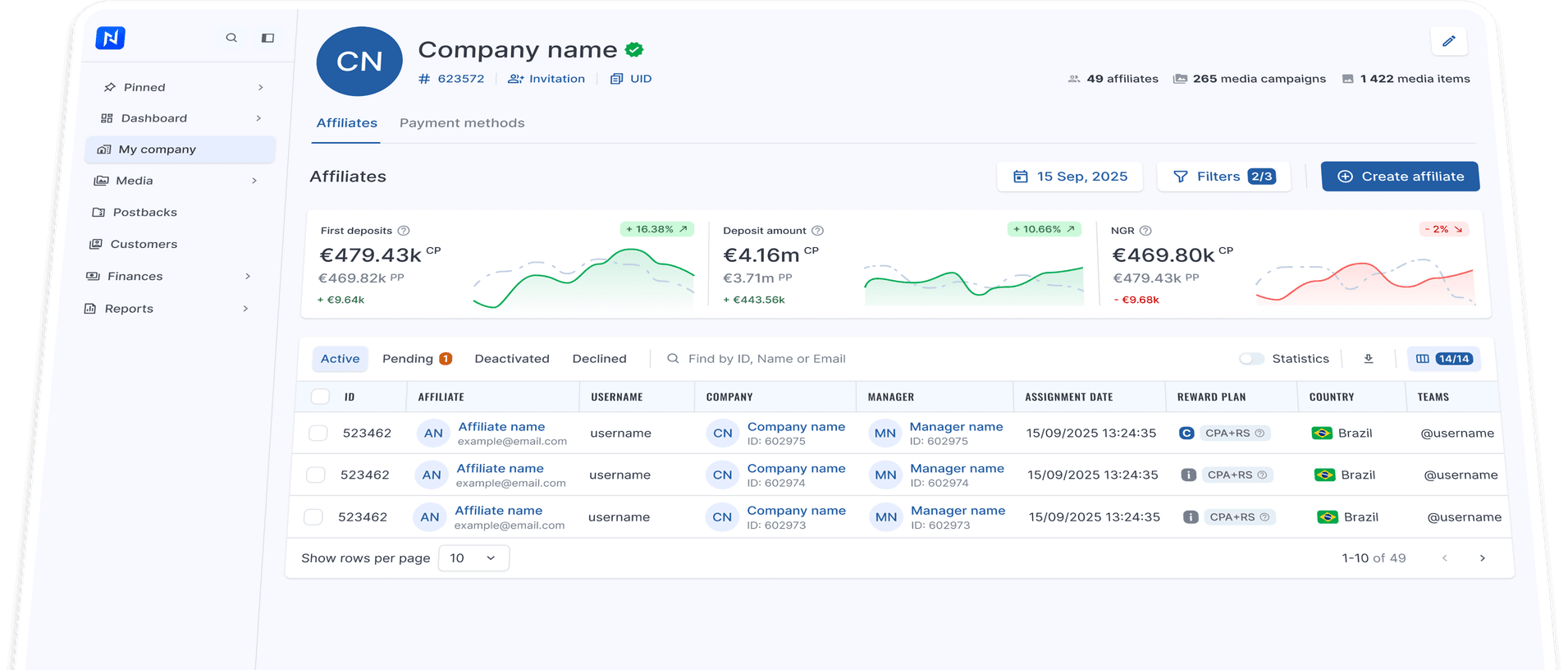
Most affiliates aren’t just one person. They are media buying teams, SEO shops, or streamer networks with multiple users logging in. As an example, let’s take a look at a fictional partner Northpeak Media Group that runs several teams across different regions. ReferOn binds the parent company once, then gives each team its own account that inherits payment, contract, and reporting context automatically.
Master account
One login covers every team account, all 2FA enforced.
Consolidated payouts
The finance head sees rolled-up balances across every team account under the company and approves payments in one place, with no separate logins required.
Single API root
Your data team pulls all data through one endpoint with a single set of keys. No rotating credentials per account, and no custom aggregation glue needed.
Scoped access · 2FA on every login
The master account sees everything. Individual team accounts only see their assigned scope. A detailed audit log records who took what action and when.
The deep view
A single row usually gives you enough context. To see the complete picture, open a profile — it’s all there. Brand assignments, active campaigns, media items in use, marketing sources, reward history, postback wiring, manager assignment dates, contact details… All of that used to occupy six screens. On ReferOn, it’s found under one set of tabs.
 Six screens, One row
+ 11 more brands · Campaigns, Media, Sources, Reward history live in their own tabs
Two paths, both short
If a new account joining an existing affiliate company has to retype the company’s payment method, KYC, and contract terms, it means the platform never stored them. ReferOn stores these once at the company level. After that, adding an account requires only a username, password, and name — the Account UID handles the linking automatically.
Even shorter: save the company’s invite URL once. Every future account skips the radio buttons too and lands directly on the four-field form.
The selection is the action
Move twenty affiliates to a different manager. Swap a reward plan for a brand. Place everyone in a region into a new group. Terminate an active session if security flags it. Every action takes just a checkbox and a dropdown selection — choose your action from the bottom bar and execute.
The row is the report
There’s a switch in the table header. When it’s off, the row shows who the affiliate is, what company they belong to, what their template is. When it’s on, the same row shows clicks, registrations, FTDs, and bonuses for the selected date range — saving you a trip to Reports just to check a number.
Flip the switch
The view above
Track FTD count, deposits, NGR, and net cash at a glance. Each card shows the current period against the previous one as a percentage, with a sparkline that follows the date range. Filter the table by GEO, company, manager, or status, and the cards update instantly.
Cards stay in sync with the table below. Apply a filter, set a date range, search by name.
The four numbers above re-run against the same scope. No second screen, no second query.
Visible in the row, configured in the profile
Postbacks notify affiliates about brand-side events — registrations, first deposits, qualified CPAs. ReferOn displays firing status directly in the row, so a quick glance at the list highlights what’s broken. To wire one up, open the profile. You’ll find a configurator for method, type, level, and incoming link, alongside a complete log of fired postbacks and server responses.
CSV, one click
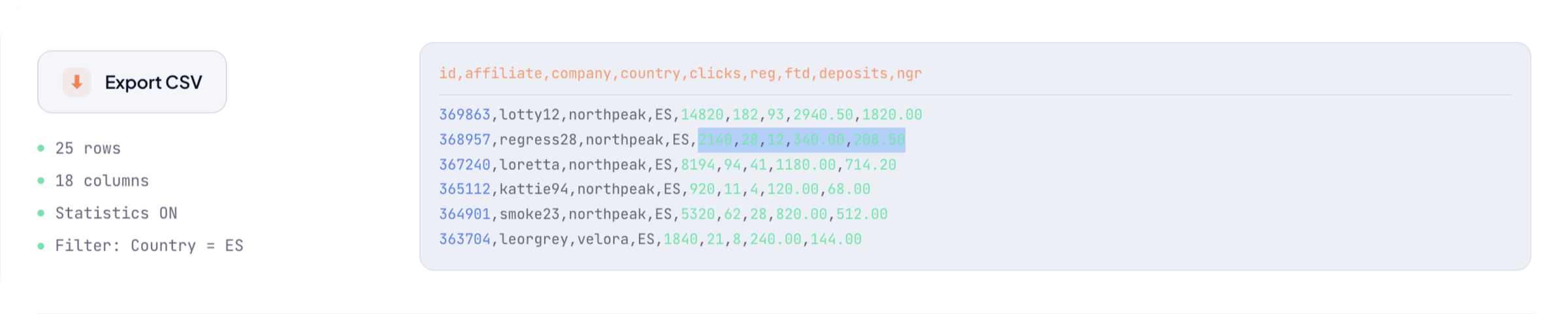
Your filters, toggled stats, and sort settings carry directly into the export. Instead of a raw database dump, you get a CSV that mirrors your active workspace. Click the icon to share your precise view with stakeholders instantly.
We use cookies
We use cookies to run this website, understand how it is used and measure our marketing. Strictly necessary cookies are always on. Everything else is your choice, and you can change it at any time. Read our privacy policy.
Manage cookie preferences
Choose which categories you allow. Your choice applies across the website and can be changed at any time via Cookie settings in the footer.
Strictly necessary
Required for the website to work: security, load balancing, and remembering your cookie choices. These cannot be switched off.
Performance and analytics
Help us see which pages are visited and how our content performs. This information is used in aggregate to improve the website.
Marketing
Used by our marketing platform to link your visits and form submissions to your contact record, and to measure how our campaigns perform.
Social media and embedded content
Allow content embedded from LinkedIn, YouTube, Instagram and Vimeo to load. These platforms may set their own cookies.